
We all know that localization is more than just translating words; it’s about capturing the essence of a piece of content and making it resonate with a new audience. Recently, I took on the exhilarating challenge of transforming Taylor Swift’s “The Eras Tour” film trailer into Chinese. Leveraging the capabilities of Phrase (TMS), Adobe Premiere Pro, and After Effects, I navigated through the intricacies of this project. With no team to rely on but my own, I embraced the responsibility of handling every aspect of the localization process. In this blog post, I’ll talk about the harmonious interplay of these tools, the challenges overcome, and the creative enhancements made during the localization process, and how eventually I got to craft a captivating localized trailer.
Let’s take a look at the result!
Step 1. Lay the Foundation with Adobe Premiere Pro
As you can see, the trailer is packed with many on-screen texts and visual effects, so the first step was to brush through the source video and find out all the on-screen texts that needed to be localized and “Replace with After Effect Composition”.

Step 2. Cleaning up on-screen texts in After Effects
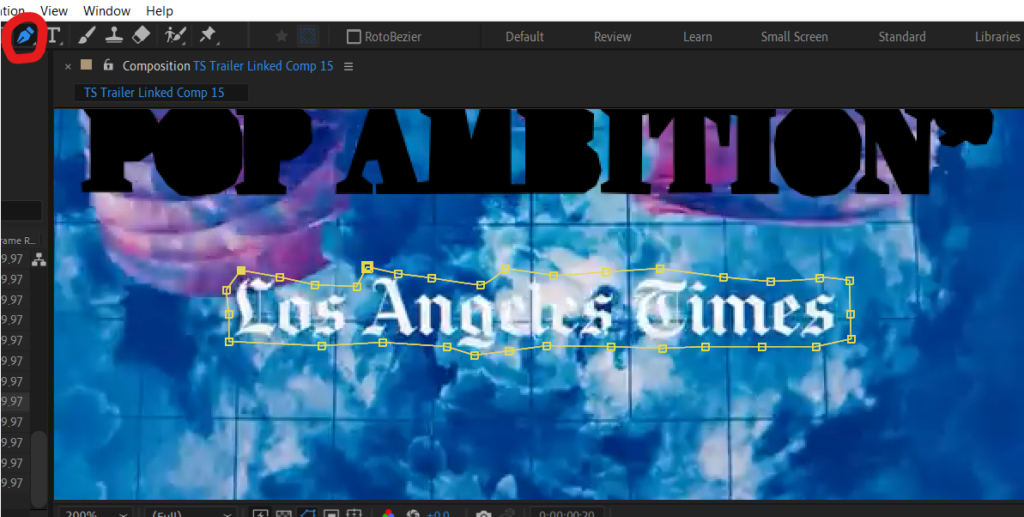
Once redirected to After Effects, after created a project, carefully outline on-screen texts that need localizing using the Pen Tool. This probably took the most of my time for the project, as you want to be as accurate as possible in order to create the best results.
Step 3. Adding a sprinkle of AI in After Effects
Armed with the AI-generated tool, I embarked on the task of cleaning up the visuals. It was a matter of selecting the target areas containing English text and letting the AI do its magic—automatically generating clean frames without certain remnants of the original text. (Since this is a fairly new feature, it is understandable that the fill might not be as perfect as we like it to be.) Click on “Generate Fill Layer” to start AI filling of the images.

Step 4. Blending Text and Graphics with Premiere Pro
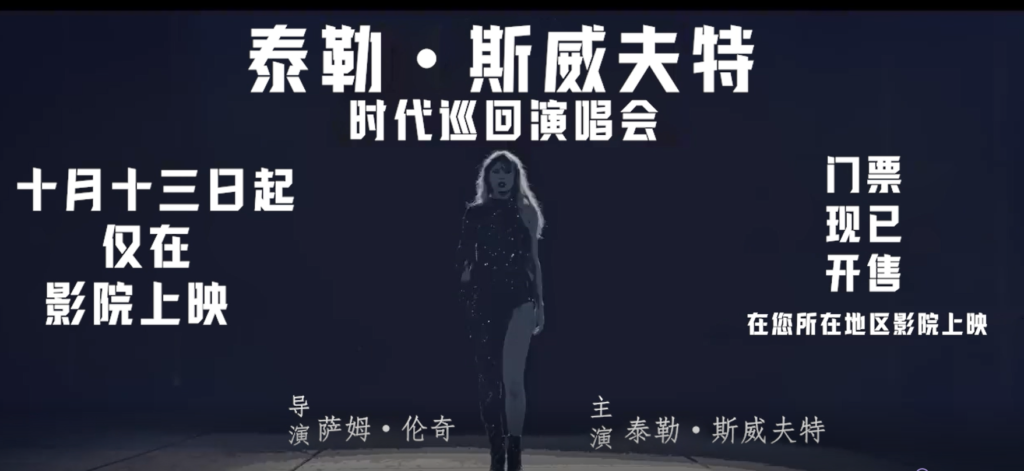
Adobe Premiere Pro was used for blending Chinese text and graphics seamlessly into the trailer. It was all about swapping out the English bits for Chinese ones, making sure everything looked smooth and on point. The timeline editing in Premiere Pro was a game-changer. It let me tweak transitions, timing, and effects to make the trailer flow just right, like a well-choreographed dance.
The tricky part here is to find fonts that resonate with the original fonts, I went into the Microsoft Fonts Library and compared different fonts to the original English ones, and hand-picked those I think have the most similar vibes.
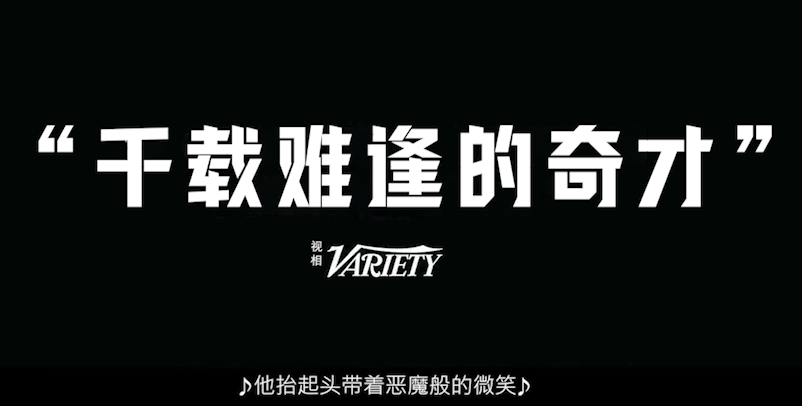
Another thing worth pointing out is that I did some research on each company mentioned on the screen and for “Variety”, I found that its Chinese name is “视相” and it has its own Chinese logo, so I went ahead and edited the logo accordingly.
Step 5. Creating Captions and Extracting them for TMS (Phrase)
Auto-generate Captions in Adobe Premiere Pro is a handy feature, all I needed to do was to go over it carefully and get rid of any typos. After that it was ready to be extracted and imported to Phrase for translation. Phrase served as my central hub for translation management. Its intuitive interface and collaborative features facilitated efficient translation workflows, allowing me to meticulously craft the Chinese script while maintaining linguistic accuracy and cultural relevance. The platform’s version control and glossary management tools were instrumental in ensuring consistency and coherence throughout the localization process.
Step 6. Quality Assurance and Iterative Refinement
Throughout the localization process, I conducted rigorous quality assurance checks using Adobe Premiere Pro’s playback features and After Effects’ preview capabilities. Any discrepancies or imperfections were addressed promptly, and iterative refinements were made to enhance overall production quality. This iterative approach, coupled with feedback from test audiences, contributed to a polished and professional localized trailer.
Reflecting on the Solo Endeavor
The localization journey was not without its challenges, from technical complexities to creative adaptations. However, these challenges spurred innovation and creativity. Leveraging Adobe’s powerful suite of tools, I explored innovative solutions, such as animated transitions for text localization and visual effects to enhance storytelling elements, elevating the trailer’s impact and engagement.
As I reflect on this solo localization odyssey, I recognize the synergy achieved by harmonizing Phrase, Adobe Premiere Pro, and After Effects. The seamless integration of these tools empowered me to navigate through linguistic, visual, and technical intricacies with confidence and creativity, resulting in a compelling localized trailer that captured the spirit of Taylor Swift’s tour in Chinese.
Optimization and Future Explorations
Looking ahead, I envision further optimizations and explorations in solo localization endeavors. This includes refining workflows, exploring advanced features within Adobe’s software suite, and embracing emerging technologies for enhanced localization experiences. The journey of Taylor Swift’s “The Eras Tour” trailer in Chinese serves as a testament to the power of harmonizing tools, creativity, and determination in the ever-evolving landscape of content localization.